If you are working on Sitecore form implementation, you might get Bad Request type issue after click of submit button or any action button on Form Page.
Fix
to overcome with this such type of issue, please make sure that form must have unique field name with without space.
If using multi-step Sitecore Form, then make sure each submit button must have unique name.
Monday, 2 October 2023
Sitecore Forms Bad Request Issue

Friday, 1 September 2023
What's New with Sitecore Search ?
Like others, I was also attendee and part of Sitecore community at SUGCON India 2023. It was great pleasure and tons of chat with everyone.
After the 2 days events, I tried to consolidate my notes and thought to share Best first with community. And Product name is Sitecore Search.
Before deep dive into Sitecore Search, I would like to point out few statements from tech communities.
Forrester, "43% of user directly go to Search box, and leads generated 2-3 times more as compare to normal journey".
Sitecore, "Today Search is about more than just entering words into a box and hoping for the right results".
Previously with Sitecore, for search we were using solr/azure/lucene search providers. and with that
Challenge for Content & Marketer, There is lack of tooling for search experience.
Challenge for Developer & IT
- long time to implement
- complex scenario for development
- if any change request, then back to Team again
- Search Expertise required
And on that Sitecore came with SaaS products to resolve above challenges and introduced 2 composable search new products.
- For e-commerce search experience
- Sitecore Discover
- Content Search experience
- Sitecore Search


In this article, I will share detailed key features and benefits of using Sitecore Search.
Benefits of using Sitecore search
- Great customer experience
- Personalization - 100% automation [easy to configure by marketers]
- Multiple Index sources, no need to changes existing external search indexing systems
- Marketer Friendly, mean marketer can easily manage search experience without any technical knowledge
- Trunkey setup building fast with simple implementation
A separate Sitecore search platform to manage, configuration on Search result items. Below are the major key points that can be used:
- Track Site search performance
- Overall engagement
- Preview Search engagement
- Search Page engagement
- Recommendation engagement
- All tracking data easily to download, sharing, exporting functionality with Marketers
- Pages
- Can have different result pages variants[A/B testing]
- Can play with common widgets across pages
- Can PIN results on particular searched key to show particular item on top
- Can boost items on particular searched key
- Can Personalized as well on particular searched key
- Can burry Current or Blacklist current particular item based on usages
- On Variations, we will be having section to get and modify items under Boost Rules, Burry Rules and Blacklist Rules
- Analytics - to view analytics
- Widget view
- Content by views
- Content by clicks
- Content report by Date Range, devices, Region
- Keyword view
- On searched key, Content report by Date Range, devices, Region
- Clicks, views, unique searches
- How many search results based on searched key
- Null searches
- Biggest gainer and decliners
- Catalog - to add different website as well, to get the results from different sources.
- Administrator tools
With Sitecore Search, we will be having a feature to get other sites search results to manage. Mean that we can interact with Indexes resources (WEB and API Crawlers) using endpoints and can manage using available tooling.
Hope this will help to understand better about Sitecore Search.
Hope this will help to understand better about Sitecore Search.
Tuesday, 29 August 2023
SearchStax Sitecore Schema populate Failing Issue
Recently we come to know with one of the known issue that if you install latest SearchStax module with Sitecore https://www.searchstax.com/docs/searchstudio/sitecore-module-2/ and then after creating new app using SearchStax Configuration module page.
Once new app created and then try to run Populate schema, will get solr connectivity exception.

Currently if you are facing such issue then
Please get latest hotfix Sitecore SearchStax official module. Directly installing will help to fix this issue.
Thursday, 1 June 2023
How to fix Solr downtime issue
Recently I came across a scenario, where solr was down. And because of that Issue - all page which using solr logic related component having issue.
Solr down time issue might occur because of
- Index got deleted
- JVM full
- Solr service stopped
- Solr server having issue
To avoid such issue in future, most of the projects used base class for Search related logic. Please make sure try-catch mechanism applied.
try
{
using (var context = searchIndex.CreateSearchContext())
{
var queryable = context.GetQueryable<S>();
//search logic
var results = queryable.GetResults();
if (results == null)
return new S[] { };
return results.ToList();
}
}
catch (Exception e)
{
Log.Error(e.Message, e, this);
return new S[] { };
}
Monday, 1 May 2023
DNS Switch for Sitecore SSO Enabled Application
Recently I worked on a scenario where after an application upgrade and before go live, we were looking to switch DNS for SSO enabled Sitecore Web Application.
There are few and simple steps to follow:
There will be 2 URLs (Live and Upgraded Application), let's say L and U
- From Site Definition configuration file, swap hostName and targetHostName values between L and U config files.
- Since we were using WSO2 for SSO authentication, and input request SAML settings were done in web.config, So just need to swap SAML setting values between L and U.
- Please connect with your WSO2 team mate for SSO Url updates, by adding new ACS Url to authenticate with SSO.
That's it. For us after above 3 changes - it worked.
Wednesday, 12 April 2023
sitecore create new content disabled Issue
There are scenarios where on Sitecore Experience editor or from Page's presentation details - Associated Content Popup, for particular rendering will see Create new Content is disabled.

To resolve above issue, I found that if we did setup Datasource template on rendering more than one. Then above feature will automatically disable.
Because if we have more than one type of template for data item to be selected on rendering. Then Sitecore will get confused that after click Create New Content, which type of data item will created.
Note: Please make sure only one type of template path set on Rendering's Datasource Template field.
Thursday, 1 September 2022
Sitecore order cloud certification strategy and planning
Last week I just completed my Sitecore order cloud Certification.

Objective of this article is about to share learning order cloud and information, pre-planning and strategy for Sitecore order cloud Certification Exam.
Preparation I personally did not felt difficulty regarding content, topics and practice platform to learn Sitecore order cloud or for exam material.
I just went though Sitecore Order Cloud e-learning course and Order Cloud Portal and that's enough for both learning and exam.
For me it took approx. 3 days to learn and practice with API.
Topics
- I would suggest to first understand order cloud terminologies
- About Sandbox Base API URL, Region and other properties.
- About User Context: Shared, API Client
- About Buyer organization and Buyer mapping with API practice
- About Buyer, Seller, Supplier and order Flow
- About Product and Price schedule mapping with API practice
- About B2B and B2C scenario from e-learning Portal
- Data flow on Sandbox during development
- Get User list, Buyers list and Product List using API.
- Add/Remove/Update products from Catalog or categories or from User group.
- Workflow: Password, Client, Refresh and Elevated with example from API call.
- Refresh workflow benefits and example.
- Marketplace scenario, how can work with Parallel marketplace.
- Reseller scenario and flow.
- In which scenarios, Product not used to visible.
- How actually webbook works. example and scenarios.
Strategy
- Few questions will be scenarios based - like discount calculations or products on live Site - that I felt after course completion and with practice easily answerable.
- Noticed not many multi-choice questions - so less complex as compare to previous exam.
- Questions are very related and if practiced or worked - easily can answer.
- All content, official documentations and API details, possible API parameters - properly mentioned and shared.
I would highly recommend to at-least learn order cloud, if not planning for Certification or Exam. Best to have.
Good luck for yours...
Wednesday, 3 August 2022
How to remove a rendering from page list using Sitecore PowerShell script ?
There might be scenario, where
- remove a rendering from list of pages/Tree
- remove broken rendering from Tree
Above we can achieve using Sitecore PowerShell script
$pageTemplateId = "{4A990Q43-71FD-4DAC-8865-5ABAAA13R911}"
$startPath = "master:/sitecore/content/YourSiteNode/Home/"
$useFinalLayout = $True
$useSharedLayout = $True
$rootItem = Get-ChildItem -Path $startPath -recurse | Where-Object { $_."TemplateID" -eq $pageTemplateId };
if($rootItem -ne $null) {
foreach($item in $rootItem) {
$renderings = Get-Rendering -Item $item -Placeholder "/header/primary-menu" -Device (Get-LayoutDevice "Default") -FinalLayout:$useFinalLayout
foreach($rendering in $renderings) {
$renderingItem = Get-Item -Path $rendering.ItemID
if($renderingItem.Name -eq "YourRenderingName") {
Remove-Rendering -Item $item -Instance $rendering -Device (Get-LayoutDevice "Default") -FinalLayout:$useFinalLayout
Write-Host $item.Name
}
}
}
}
Saturday, 26 February 2022
HTTP Error 500.19 - Internal Server Error Sitecore identity server

If you are facing the below issue with Sitecore 9, 10, or 10.1. Then it is recommended to install the below dependency to resolve this issue.
https://dotnet.microsoft.com/download/dotnet-core/2.2
But before installation, I would suggest verifying existing .netcore in your system
by running dotnet --info on PowerShell (as admin)
Hope this will resolve your issue.
There is also another possibility for this issue that from
Turn Windows feature on or off - choose below options

You may also face still face the same issue with Sitecore 10.2 in that case you must be required to install as this is recommended by Sitecore https://doc.sitecore.com/xp/en/developers/102/sitecore-experience-commerce/system-requirements.html
Please go to this link to download https://dotnet.microsoft.com/download/dotnet-core/3.1
Hope the above options will help you to fix this issue.
Monday, 24 January 2022
How to start with Sitecore JSS using react framework ?
Hope you are already aware of the basics of Sitecore JSS and react as well. Here in this article, we are going to
- Setup Sitecore JSS app with React framework
- Connect/Map JSS app with Existing Sitecore Instance
- Deploy JSS App to Existing Sitecore Instance
The steps are as below
- Sitecore 10.2 setup - without SXA [ex: sc.dev.local]
- Sitecore PowerShell extension 6.3
- install Sitecore package by clicking JSS compatible module
- create JSS key in masterdb /sitecore/system/Settings/Services/API Keys/
- goto Repo location (where wanted to create Sitecore JSS Application)
- install jss cli by cmd/powershell as admin and run below command
- >npm install -g @sitecore-jss/sitecore-jss-cli
- To create Sitecore JSS app using react framework run below command
- >jss create jssapp react
- >jss start [to check it's working]
- add new site binding dev.local instance as jssapp (HTTP) and make host entry in C:\Windows\System32\drivers\etc
- run and check http://jssapp/
- run command >"jss setup" and add details as requested
- please verify hostname from JSSAppLocation/sitecore/config/jssapp.config
- run command >"jss deploy config" [To deploy Sitecore JSS Application config to Sitecore instance]
- run command >"jss deploy app -c -d" [To deploy everything from Sitecore JSS Application to Sitecore instance]
- verify again "http://jssapp" [To verify JSS application changes on hosted Sitecore instance]
Hope this will help you to set up quick with the Existing Sitecore instance.
Thursday, 13 January 2022
How to fix HTTP Error 502.5 Sitecore Horizon Issue ?
You may face the below issue while setting up Horizon on your machine.

And to resolve this issue, it is must verify is .net core 3.1 and 2.1 are on your machine. Please use the below command to verify
dotnet --info (PowerShell as admin)
If not then please install from below
https://dotnet.microsoft.com/en-us/download/dotnet/2.1
https://dotnet.microsoft.com/en-us/download/dotnet/3.1
Once installed, run horizon instance again.

The above same issue you may also face with Sitecore Identity server and solution will be same.
Wednesday, 12 January 2022
How to uninstall Horizon from existing Sitecore instance ?
There may be a scenario, where we would need to uninstall the horizon instance. For that, we would require the same tool can be downloaded from https://dev.sitecore.net/Downloads/Sitecore_Horizon.aspx
We have chosen for our instance as

Please add the below variables in the same file

[string]$PhysicalPath = $horizonPhysicalPath,
now please comment InstallHorizonHost method calling and add below as per screenshot

Import-Module "$PSScriptRoot\InstallerModules.psm1" -Force
Uninstall-HorizonHost `
-InstanceName $InstanceName `
-PhysicalPath $PhysicalPath
Once done, run the PowerShell script. Horizon instance will be uninstalled.
Tuesday, 23 November 2021
Steps to setup SearchStax in Sitecore for multi-site
Previously we setup SearchStax with Fresh Sitecore Instance and that will fulfill requirement for one Search Page on Single-site Sitecore Instance.
Now there will be scenarios like
- Global Search page that will list result from Multi-Site
- For each Site(In multi-Site), there will be Separate Search Pages
In this article, will implement Global Search Page that will list result from Multi-Site
Steps to Setup Global Search Page will be same as previous article SearchStax with Fresh Sitecore Instance.
Only need to update root entry and update by adding multiple root entries while Creating SearchStax Index as below

Hope this help.
In next article we will setup multi Search pages for each Site.
In next article we will setup multi Search pages for each Site.
Step by Step to Setup SearchStax with Sitecore
In this article, We will do setup SearchStax with running Sitecore Instance.
Setup Prerequisites
- Sitecore Instance must be up and running (where we will be setting up SearchStax)
- Check compatibility for SearchStax package with Sitecore Instance from below URL https://www.searchstax.com/docs/searchstudio/sitecore-module/
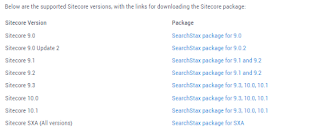
- Before Installation, please collect SearchStax's Credentials for
- SearchStax Portal
- Collect Search and Suggest API URL from https://searchstudio.searchstax.com/apps-management Search API Section
- Solr read-only and Admin (Username/Password) from below Location
- To get Index Core Name - Go to Search URL from https://searchstudio.searchstax.com/apps-management Search API Section. For example: https://xxxxxxx.searchstax.com/solr/Index-Core-Name/emselect

Steps to Setup Searchstax
- Login to Sitecore Instance
- Install Searchstax module as per compatibility (Can take reference from above Prerequisites)
- Once package installation done, configure Searchstax index from Launchpad View or by URL https://YourInstance/searchstax/configuration


- Once clicked on Sitecore Module Configuration, will see below screen. After this click on Create An Index and fill all details (As per mentioned, in above Prerequisites)

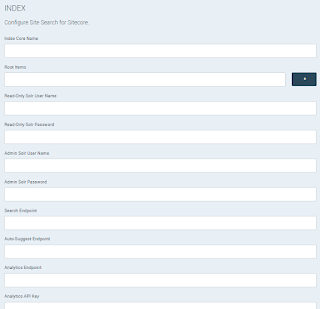
- Once Index creation done, Go to Control Panel and trigger below action
- Click on Populate Solr Managed Schema (select only SearchStax Index)
- Index Managed (select only SearchStax Index)
- After that click on https://searchstudio.searchstax.com/apps-management/ Search API section. Click Reload Schema.
- Now will do Search configuration from https://searchstudio.searchstax.com/search-configuration and will add below entries if not there. After change - Click Save and Publish.

- From Relevance modeling https://searchstudio.searchstax.com/relevance-models will Select Default Model and then add fields where search will happens. For example

- Now From Searchstax setup is done. To verify with Sitecore will add Search Page Item and then Publish Search Page.


Hope this was easy and helpful to you. Please share if face any challenge during Setup.
Note:
- Please make sure to save and Publish after every Change.
- All above Steps must need to be done sequentially.
- After Every Changes in configuration File, Need to Click Reload Schema from Searchstax Portal.
Sunday, 14 November 2021
Introduction to SearchStax - Search with Sitecore
There are various providers to implement Search with Sitecore Instance. Today's article will help to understand about Searchstax with Sitecore.
Currently we have options as provider to implement search like - Lucene, solr, azure. Also tools that makes search Implementation easy, fast and with analytics features - Coveo & Searchstax.
But with my experience on Searchstax there are below points as feature which makes it unique and reason to use Searchstax.
1. Readymade Search (ready to use with any Sitecore project in next 10 mins) with Multi-site options - with no code change required.
2. Easy interface to manage analytics and only Integration activity from Sitecore CMS.
3. Custom Search Page Implementation (Can change any existing Custom search page provider connection from existing to SearchStax search API)

There are also list of features with SearchStax to use for Search analytics
facet, sort, hit highlighting
Stop words, synonyms, spell check and auto-suggest
Field boosting, rules and Promotions
Reporting options on Search analytics
Readymade search page theming, Preview feature on Search page.
Benefits to use Searchstax for search
High availability, no field limits
Search item's click or searched key level tracking
No-additional pre-requisites skill required for developers
There is no change for below points
for computed index, there is no change in code/configuration to implement.
Field/Template include/exclude configurations are same as with other providers.
Connect to any environment search index from developer's machine.
From developer's machine - index setup and code debugging as very easy [bcz of search endpoint API].
Friday, 1 October 2021
How to fix Sitecore xConnect 403.16 issue ?
In this article, will share steps to fix issue - Sitecore xConnect throwing 403.16 - forbidden
Below are the steps to resolve:
1. go to IIS and select your instance's xConnect site. (Let's say mylocal.xconnect)
2. double click on SSL Setting

3. update settings as below

4. Now hit your instance, (e.g. https://mylocal.xconnect)
Hope this work. If still issue please comment.
Wednesday, 29 September 2021
How to get url web status in bulk ?
In today's article, would like to present script. And the purpose of this script to Get url web status in bulk.

Steps to Execute:
1. Please find script by click here
2. Please update list of urls in one file and placed at one place (Let's say D:/urls.txt)
3. Open PowerShell and execute script as .\urlhealths.ps1
Note:
Please do not forget to update path in script to get url list (line no. 42)
Also please ensure urls.txt contains list of url (one url in one line)
Hope this will help.
Saturday, 11 September 2021
Custom data source on Sitecore template field
Actually there are many ways to apply data source on Template's Field, Rendering Item, Rendering data source Location and Rendering parameter.
- using sitecore data item path/id
- using sitecore query/fast-query
above both - most used ways.
But there are many scenarios, where after applying data source path wanted final list after modified data by type, filtering, custom code logic or any dynamic logic on data source .
But there are many scenarios, where after applying data source path wanted final list after modified data by type, filtering, custom code logic or any dynamic logic on data source .
Custom class as data source
We can do this activity as well using custom class, and we can call them on
We can do this activity as well using custom class, and we can call them on
by setting data source Field value as
code:Sitecore.CustomDataSources.UpdateDataSource,Sitecore.CustomDataSources
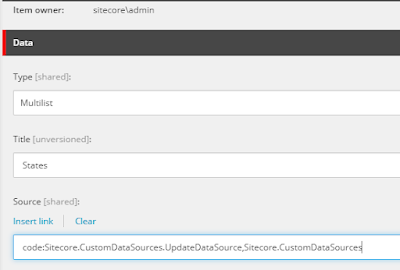
PowerShell script as data source
There are also another way to do this using PowerShell script.
by setting data source value as
script:/sitecore/system/Modules/PowerShell/Script Library/CustomDatasource
and place your PowerShell script at above location with File name as CustomDatasource
and place your PowerShell script at above location with File name as CustomDatasource
Hope this will help.
Friday, 27 August 2021
Sitecore dropdown fieldtype validation
In this article, we will try to achieve droplink's field validation. So to before start there is a concept that sitecore droplink actually store item's ID.
And to achieve this we have to apply validation on dropdown fields, just apply regex there as ^.{38}$.
Please see below screenshot

Hope this will help.
Tuesday, 24 August 2021
git pull error: cannot stat Filename too long
In this article, we are going to discuss about an issue related to GIT
that while trying to take latest from one of the branch. And after pull command facing issue as
git pull error: cannot stat Filename too long
Also noticed that other teammates have not this issue.
After spending some time on this issue found the fix, so thought to share with community.
Fix:
just open GIT Command prompt
first I tried git pull but the same issue because of Windows API limitation of file paths having 260 characters or fewer.
To fix this issue ran below command
git config --system core.longpaths true
after this trigger git pull and it works.
Hope this will help
Subscribe to:
Posts (Atom)